 Textend
AI edits focused on the passage you choose
Select a sentence or paragraph, make a request, and review the change in place. Textend also optimizes context and responses to reduce AI token use, avoiding unnecessary generation alongside whole-draft change hunting.

A sentence-level problem can start with that sentence
Most of a draft may already work. The opening is too long, a sentence is unclear, or one explanation needs tightening. You know where the problem is, and that is where you want help.
A request for a whole-document rewrite returns a whole document to read. You then have to find the changes and check passages you were already happy with. For a local problem, that review can become more work than the edit itself.
With a local edit in Textend, choose the target before making the request. Select a sentence to tighten it, or a paragraph to reshape it. The suggestion returns to that passage for review and acceptance, while unrelated passages stay in place.
The fictional book discussion notice below makes the scope concrete: shorten the event details and leave the cancellation paragraph as it is. The task is to improve the passage at hand.
Original: book discussion notice
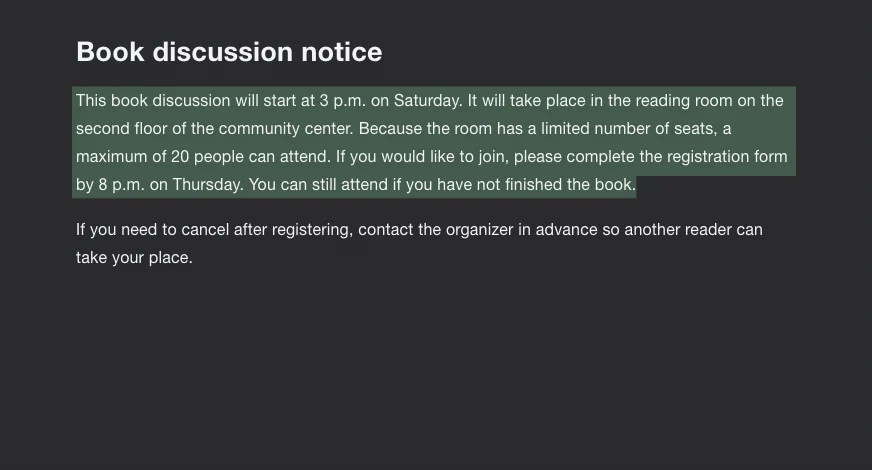
This book discussion will start at 3 p.m. on Saturday. It will take place in the reading room on the second floor of the community center. Because the room has a limited number of seats, a maximum of 20 people can attend. If you would like to join, please complete the registration form by 8 p.m. on Thursday. You can still attend if you have not finished the book.
If you need to cancel after registering, contact the organizer in advance so another reader can take your place.
| A local editing task | When requested as a whole-document rewrite | A targeted edit in Textend |
|---|---|---|
| Choose the target | Describe what needs changing, then inspect the returned draft. | Select the sentence or paragraph before asking. |
| Read the result | Find and compare changes across the two drafts. | Compare the suggestion at its original location. |
| Decide what to keep | Review the rewritten draft and take the parts you want. | Accept, cancel, or refine the current change. |
Choose this passage and leave the rest in place
Select the first paragraph, from “This book discussion” through the welcome to readers who have not finished the book. Leave the cancellation paragraph unselected. Open AI collaboration with Command+K on macOS or Ctrl+K on Windows, and check the scope shown for this request.
The selection gives “help me revise this” a concrete target. The original stays in view, with the request and suggestion connected to it. There is no need to copy it into a chat window and bring the result back.
Editing scope and reference context are different. AI can use nearby or relevant text to understand a passage without rewriting all of that context. Quick edit works with complete sentences; when selecting only a few words within a sentence, check the scope indicator and actual preview before accepting.
After choosing the passage, say how to change it
Once the selection identifies the passage, the request can be specific: “shorten this paragraph,” “make this sentence more direct,” or “keep the facts and adjust the tone.” You do not need to explain where it sits in the document or reorganize the whole draft for one sentence.
You can copy the request below. It asks for no invented attractions and gives no permission to change the attendance limit or deadline. For a product description, name the usage conditions that must remain; for a research summary, name the sample limits and uncertainty.
This is a bounded shortening task, so use Quick edit to preview changes in the draft. If you are still deciding what to lead with or want an explanation of the tradeoffs, use Collaborate to discuss it first. Discussion proposals also need your review and decision.
Shorten the selected notice. Make the time, place, and registration clear. Keep the 20-person limit, the 8 p.m. Thursday deadline, and the invitation to readers who have not finished the book. Add no promises.Reducing AI token use takes deliberate engineering
A targeted edit also focuses the model’s work. To shorten this notice, the model returns the change for that passage. The unchanged registration details stay in the editor, without generating the whole draft again to deliver one local edit. Compared with a full rewrite, this avoids output tokens the task does not need.
We have invested sustained engineering work in reducing unnecessary AI token use. That goes beyond adding a selection button. Quick edit organizes reference context around the target and removes its duplicate from the reference body. Responses are compact too: the editor keeps the original and target position, so the model only needs to return the change and essential operation details.
These optimizations address repeated input and redundant output separately. Relevant context is still supplied for the task, and a short document may fit entirely within it. A targeted edit does not mean the model sees only the selected words. The aim is to remove duplicate and irrelevant work while keeping the material needed to understand the edit.
That work extends to on-demand reading in long-document discussions, bounded context for continuation, and reusable prompt prefixes for caching. Cache support and hits depend on the connected service and model; they may reduce the billed cost of repeated input, rather than eliminate those input tokens. Actual use and cost depend on the document, task, and model, so we promise no fixed saving per request.
See the change where it belongs
When the suggestion arrives, compare the original and proposed text at the passage you chose. Focus the review on this change and how it fits nearby writing, rather than finding it in another complete version of the draft.
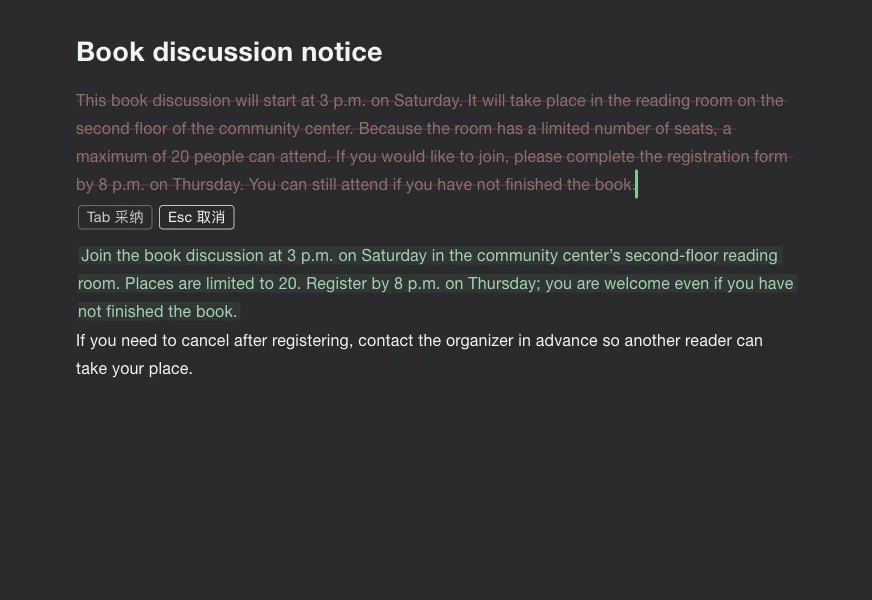
The screenshot below uses a preset suggestion in the real Textend editor to explain the review step. It is not a model response or a promise that you will receive this wording. Different services and models may suggest different text.
In the preview, read the removed wording and the proposed text. Check each detail: 3 p.m. Saturday, the community center’s second-floor reading room, the 20-person limit, the 8 p.m. Thursday deadline, and the welcome to readers who have not finished the book. Seeing both versions makes the changes inspectable.
Also read the unchanged paragraph nearby. It explains how to cancel. A suggestion adding “registrations cannot be canceled” would contradict it, however fluent the sentence sounded. Reading only the new text can hide that conflict.
| What to check | What must remain |
|---|---|
| Time and place | 3 p.m. Saturday, second-floor reading room |
| Limit and deadline | Maximum 20 people; register by 8 p.m. Thursday |
| Who can attend | Readers who have not finished the book are welcome |
| Fit with the next paragraph | Keep the instruction to contact the organizer to cancel |
Accept this change and keep writing
When the quick edit works, press Tab in its preview or click Accept. Then read the revised paragraph from the start. Comparison reveals changes; reading the accepted text reveals whether it flows, whether the deadline is clear, and whether the invitation still reassures people who have not finished the book.
The revision below removes repetition from the event details while keeping the time, place, 20-person limit, deadline, and invitation. The cancellation paragraph is unchanged. Accepting this suggestion does not require replacing your draft with a new whole-document version.
One possible revision
Join the book discussion at 3 p.m. on Saturday in the community center’s second-floor reading room. Places are limited to 20. Register by 8 p.m. on Thursday; you are welcome even if you have not finished the book.
If you need to cancel after registering, contact the organizer in advance so another reader can take your place.
Keep the original or undo an accepted change
If a suggestion removes a necessary condition or uses the wrong tone, press Esc or click Cancel to keep the original. Edit it yourself or make the next request more specific: “The last version dropped the invitation to people who have not finished the book. Keep that sentence.” You do not need to accept a version simply because AI supplied it.
If you notice a problem immediately after accepting, use Command+Z on macOS or Ctrl+Z on Windows. In this exercise, with just one accepted edit, one undo restores the original. If you make further edits, undo steps through those more recent actions first.
If you change the target passage while waiting, the suggestion may no longer apply. Work from the current draft and select the passage again for a fresh request. Do not reverse useful work just to force an old suggestion into place.
Use AI where the draft needs it
If an email opening wanders, work on the opening. If a feature explanation is unclear, work on that paragraph. Start from the problem you have already noticed: select the passage, make the request, compare in place, decide what to keep, and continue writing.
The value of a targeted edit is a clear task and a focused review. Work through different passages as needed, improving the draft one decision at a time. Choose a broader collaboration when you want to discuss the structure as a whole.
Review helps you see changes; it does not verify facts for you. The organizer must confirm an event’s time and capacity. New figures, quotations, and claims in an article still need checking against sources. Keeping the original, canceling, and undoing give you room to reconsider.
Try a targeted edit with the sample
Open the sample .md file above in Textend and select one paragraph to try. Work in the writing view throughout, without switching to source mode or learning Markdown syntax first.
Starting a new AI writing task requires Pro or an active trial, plus your service URL, model, and API key in Settings → AI Services. If you have not configured one, finish your draft first and follow the handbook’s AI section when ready. Basic editing and saving work independently.
A third-party AI request may include the selection and relevant context. Charges and data handling depend on your chosen service. This fictional example is suitable for a first practice pass; keep material you cannot share with that service out of the exercise.